25-July-2006
Message Attachments
The Agent 4.0 beta trials continue to go well. One of the most popular aspects of the beta trial is Agent's new capabilities for handling Usenet and Email attachments.
Attachment Folders
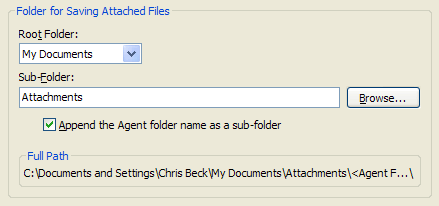
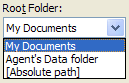
Agent 4.0's Folder Properties gives you several ways to control where file attachments are saved.
Check "Append the Agent folder name as a subfolder" and Agent will automatically create a separate attachment folder for each newsgroup. You can refine this behavior even more with Folder Property Schemes (see below).
|
Saving Attachments
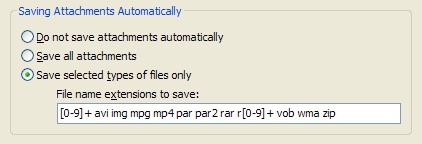
Agent 4.0's Folder Properties also provide you with granular control over how attachments are saved.
For a binary newsgroup, you might choose to automatically save attachments based on the file type. This is ideal for .RAR files and other archives that require additional processing outside of Agent.
[0-9]+ matches file extensions that were split into a sequence such as .001, .002, .003, etc.
|
Attachment Commands
|
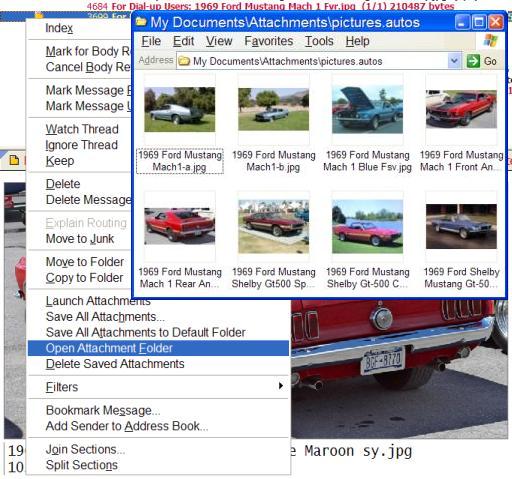
In Agent 4.0, the menus with attachments commands were reorganized for ease of use.
There is a new Open Attachment Folder command that opens an Explorer Window containing the current attachment. If the current message does not have a saved attachment, Agent will open the default attachment folder for that newsgroup.
|
Folder Property Schemes
|
The diversity of Usenet and Email communication
requires different settings for different folders. This is why Agent allows you to configure the properties of each folder separately.
But, with so many folders, how do you manage them consistently? The 4.0 solution is Folder Property Schemes.
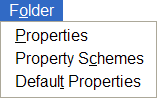
Schemes allow you to customize a subset of properties and apply them to more than one folder.
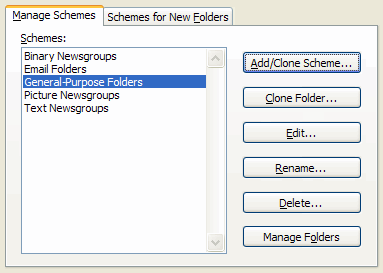
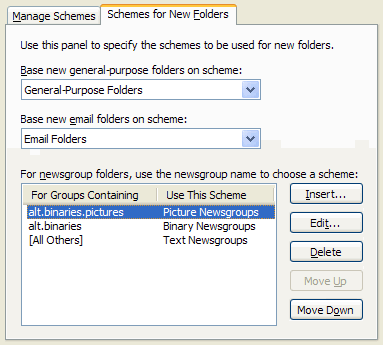
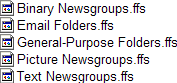
In the example, the user has separate schemes for managing Binary, Text and Picture newsgroups. The "Picture Newsgroups" scheme overrides the default setting for attachments, saving all pictures files automatically. (See the dialog above for the settings.) Notice also that there is a separate property scheme for Email folders.
Agent automatically assigns the correct scheme when you create a new folder. In the example, Agent will assign the "Pictures" scheme to newsgroups whose name contains the text "alt.binaries.pictures".
Folder Schemes are stored as separate .FFS files in your Agent data directory so you can easily share them with other users.
|
The attachment handling features of Agent 4.0 are just one example of Agent's depth of functionality. For a general description of the other features in Agent 4.0 see our previous announcement.
Regards,
The Forté Team
|
Recent Bulletins
20-Oct-2014
Forté releases Agent 8
Just one click will select, download, analyze, join, decode and repair large Usenet binaries...
28-Jul-2014
Agent 8 in Final Beta
We expect general release to be in the next few weeks...
28-Aug-2013
Agent 7.2 and Agent Usenet (APN) Support 30 Connections
We've increased the number of simultaneous connections to 30 for both new and existing APN users...
More Bulletins »
|